For a long time, we’ve largely used computers the same way: by opening apps, navigating between tabs, and moving data from one window to another. But this structure is going to change. OpenAI is altering how people think about AI-powered web browsers by making ChatGPT Atlas, which is an AI-powered workplace instead of just a way to get to websites.
Atlas builds on Chromium and adds ChatGPT’s intelligence to online browsing. Instead of switching tabs or copying content into a chatbot, people can ask questions, summarize articles, evaluate information, and automate jobs online. You can finish tasks on other pages without interrupting your work because the browser remembers your activity.
Atlas’s core purpose is more than just making browsers better. This is a step toward computers that are run by AI, where people engage with the system through prompts instead of apps, and smart agents coordinate tasks across the system and the internet. If this path works out, tools like Atlas could transform how people study, work, and get around in the digital world in the next few years.
What is ChatGPT Atlas?
Atlas works similarly to a conventional web browser, but it also offers intelligent features. Atlas was developed by OpenAI and combines regular browsing features with ChatGPT’s conversational capabilities.
The interface allows users to directly input a website address or inquiry, eliminating the necessity to open a search engine and transfer tabs. In the event that you inquire, “What is the most suitable travel insurance for Spain?” an AI-generated response will promptly appear, including links, images, and videos.
OpenAI defines Atlas as “a new way to browse with ChatGPT. Atlas transforms the browser from a passive tool to an intelligent workplace, allowing users to search, understand information, and complete tasks without switching between tabs or platforms. This is accomplished by incorporating AI into the browsing experience.
Must-Know Features of ChatGPT Atlas
Here’s a run down of Atlas AI browser features:
1. Ask ChatGPT Sidebar
One of Atlas’ most renowned features is the Ask ChatGPT sidebar. It can be accessed directly from the current page, eliminating the necessity to open a new conversation window or transfer text to another tool.
Select a section of text and request that the AI summarize, simplify, translate, revise, or translate it into a different language. Choose a different tone. This intelligent browsing assistant has the capacity to observe your current website and enables it to offer contextually pertinent responses without disrupting your browsing experience.
2. Smart Browser Memory
Atlas presents a more efficient method of browsing with its memory functionality. When activated, the browser can retain a record of the pages you have accessed and the categories of searches you do. Over time, this enhances its comprehension of your choices and context.
If you conducted research on running shoes yesterday, Atlas can retrieve the product pages you examined and present them again at your request.
3. Agent Mode
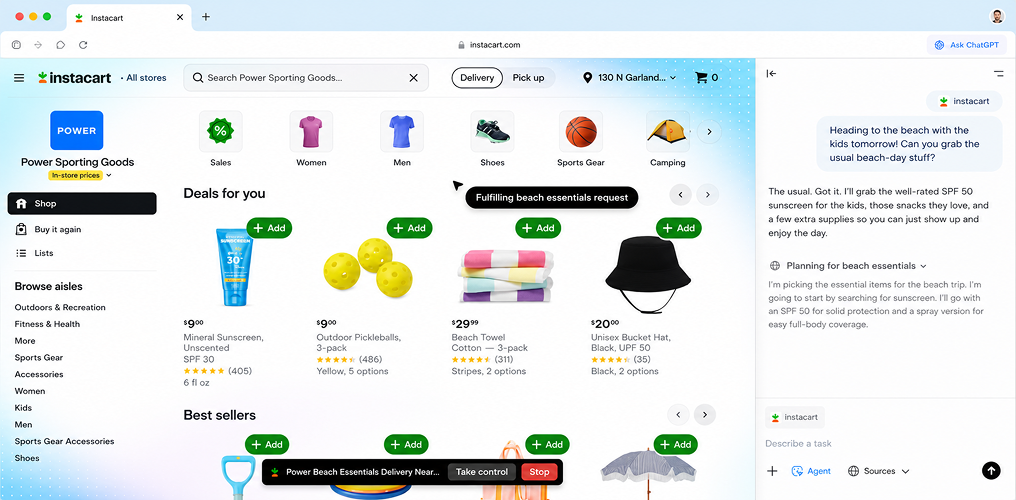
The most advanced feature of Atlas is Agent Mode, presently accessible to paying users. In contrast to other tools that merely provide assistance, Agent Mode in Atlas is capable of executing operations within the browser.
Upon activation, the AI is capable of searching for products, opening sites, comparing choices, and adding items to a shopping cart. In intricate situations, one may request it to locate flights, analyze hotel rates, or curate a selection of computers within a set budget. The browser displays each step undertaken by the AI and requests confirmation prior to executing significant operations, such as transactions.
4. Real-Time Writing Assistance
Apart from being an AI web assistant browser, Atlas additionally functions as an integrated writing assistant, providing realtime writing assessment for content tasks like composing an email, publishing to a business network, or creating a document. It helps with tone, shortening long paragraphs, making things clearer, or offering different words.
5. Assessment & Feedback
Another functional attribute is Atlas’s capacity to assess the page you are presently observing. When evaluating a website, going through an article, or examining a social media profile, you may solicit real-time input or insights from the AI.
Allowing people to evaluate a page, provide suggestions for improvements, recognize chances for search engine optimization, or summarize a lengthy effort. The amount of time needed to manually insert text or screenshots into a chatbot is significantly reduced from what it was before.
6. Real-Time Data Analysis
Atlas is capable of interpreting information displayed on your screen. When examining analytics dashboards, marketing reports, or spreadsheets on your browser, you can request the AI to analyze the data and identify trends or patterns.
The identification of growing trends in social media analytics, surges in website traffic, and the generation of content ideas based on performance metrics are all facilitated by this functionality.
7. Conversational Search of Browser History
A notable although modestly impactful feature is the search function for conversational history. Rather than manually sifting through your browser history, you may effortlessly request Atlas to locate an item you have already accessed.
For instance, you may input: “Display the chicken parmesan recipe I browsed yesterday,” or “Locate the SEO article I studied last week.” Atlas examines your browsing history and retrieves the pertinent page.
8. Privacy and Control Alternatives
Due to Atlas’s profound integration of AI into browsing, privacy protections are a crucial aspect of the design. Users can also use incognito mode to restrict Atlas’s access to specific pages, or completely deactivate data sharing.
ChatGPT Atlas Use Cases and Examples
Atlas streamlines the process of research, execution, and creation into a single, continuous workflow, eliminating the need to jump between different applications. To illustrate how something works in practice, here is how it goes:ChatGPT Atlas Use Cases and Examples
1. Enhanced Research and Information Acquisition
Atlas streamlines research by enabling the summarization of extensive content, facilitating direct inquiries on a page, and allowing for the comparison of information across tabs. Regardless of whether you are perusing papers, blogs, or viewing videos, you may promptly distill essential information or elucidate intricate segments.
When browser memory is on, it can retrieve previous searches, so rendering continuous inquiry cohesive rather than disjointed.
2. Task Automation Utilizing Agent Mode
Agent Mode enables Atlas to transcend mere help and actively undertake actions on your behalf. It may organize travel itineraries, evaluate products, retrieve data, or execute complex workflows such as adding items to a shopping cart.
Users can assign monotonous or time-consuming activities to AI, allowing them to monitor the execution of each step instead of manually navigating across websites.
3. Content Development and Writing Assistance
Atlas functions as an integrated writing collaborator throughout the internet. It assists in editing, rephrasing, and generating information in real time, encompassing the refinement of emails, social media posts, and the authoring of blogs or summaries.
The output is more pertinent and congruent with your aim due to its comprehension of the context of your viewing.
4. Professional and Technical Workflows
Atlas enhances efficiency for marketers, developers, and writers in their daily duties. You can examine competing websites, assess messaging, troubleshoot coding, or streamline technical documentation,all without navigating away from your current page.
This renders it particularly advantageous for tasks that generally necessitate numerous tools and frequent tab switching.
5. Daily Productivity and Lifestyle Activities
Atlas seamlessly integrates into everyday usage. You can monitor job applications, evaluate reviews prior to purchase, or convert a recipe into a ready-to-order grocery list.
By integrating browsing with action, it diminishes the effort required to transition from “searching” to “doing.”
Conclusion
ChatGPT Atlas transcends conventional browsers, offering a view into the future of web interaction. The integration of context, automation, and artificial intelligence into a unified experience facilitates more intelligent perusing, enhances writing, and expedites research. The trade-off entails mastering the judicious application of this increased ability, integrating productivity with privacy, and understanding the constraints of AI and AI browser.
In the same way that every powerful equipment will reflect our exploitation of it, Atlas will do the same. It is possible that, when implemented appropriately, it will represent the greatest revolutionary breakthrough in web browsing that has occurred since the beginning of Google.
OpenAI says ChatGPT doesn’t learn from browser data unless users allow it. You can remove browser memories, view saved data, or explore surreptitiously, but privacy experts advise caution.
ChatGPT is an AI conversation tool, whereas ChatGPT Atlas is a ChatGPT integrated browser that integrates into your browser, like a software extension.