Optimizing Your Google Business Profile

Setting up a Google Business Profile merely registers your business on the map, but it does not guarantee visibility. A profile that exists without thorough optimization remains largely invisible, while fully optimized profiles earn prime placement in the Google Local 3-Pack and get cited as definitive recommendations by generative AI engines like Gemini.

Ultimately, Google Business Profile Management and elevating your local search performance comes down to optimizing basic signals like category accuracy, visual media, field completeness, and ongoing engagement.

Selecting Primary & Secondary Categories

Choosing the right category taxonomy is one of the most powerful levers for establishing search relevance in Google’s local ranking algorithm. Setting an accurate primary category defines your baseline search intent and unlocks specific profile attributes. Secondary categories expand your visibility across relevant long-tail search queries. 

It has been observed that businesses with complete information and categories can see a 7x increased clicks compared to businesses with incomplete profiles.

Primary Categories
Secondary Categories
Best Practices for Maximum Relevance

Structuring your business categories requires aligning your profile taxonomy directly with actual revenue drivers while protecting your listing against algorithmic penalties. In a study of 187 factors by local search experts, the primary Google Business Profile category ranked as the highest-impact Local Pack and Maps factor. That’s why strategically choosing your primary classification and auditing secondary categories ensures maximum local pack visibility without triggering Google’s automated compliance filters.

1 .Pick the narrowest primary category that represents your main revenue driver. 

2. If your business offers multiple services, align the primary category with the service that brings in the highest customer volume or revenue.

3. Adding irrelevant secondary categories dilutes your primary topical authority and risks triggering automated review flags or account suspensions.​

4. Analyze the primary categories used by top-ranking local competitors to identify the specific classification Google currently favors for your target market.

5. Ensure your chosen categories directly reflect the primary services, headings, and structured schema markup on your linked website landing page.

6 . Avoid frequently switching your primary category for short-term seasonal promotions, as major category changes can trigger re-verification flags and temporary ranking drops.

Common Categorization Mistakes

Selecting incorrect, overly broad, or misaligned categories directly confuses Google’s ranking algorithms and suppresses your local map pack visibility. Google’s own guidelines instruct businesses to choose the fewest categories needed to describe their core business, reinforcing that categories should be accurate and focused rather than broad or exhaustive.

Avoid these frequent categorization pitfalls to ensure your profile establishes clear topical relevance and captures high-intent local searches.

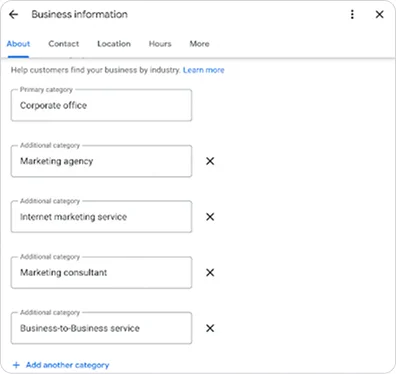
Selecting broad parent categories and choosing generic terms like "Corporate Office" or "Consultant" instead of specialized titles like "Financial Planner" or "Tax Attorney".

Selecting categories purely to chase search volume rather than real-world service lines.

Failing to audit top-ranking 3-pack competitors in your local market to see which primary and secondary categories Google is rewarding.​

Adding marginal or barely related secondary categories just to reach the 10-category limit, which dilutes your primary topical authority.

Selecting listing categories that are not reflected in the service headers, copy, and structured schema markup on your linked landing page.

Constantly changing your primary category to chase seasonal trends, which causes ranking volatility and can trigger profile re-verification flags.

To dive deeper into category matching strategies and see a complete industry-by-industry breakdown, read our complete guide on Choosing the Right GBP Category for Improved Search Presence.

PRO TIP - Complete Every Profile Field

To maximize visibility and conversion, complete every section: keep standard and holiday hours updated, choose all relevant attributes (like accessibility or amenities), detail your services and product catalogs, craft a clear 750-character business description, and enable direct messaging to capture high-intent leads.

Optimizing Photos & Videos with Key Shots of Your Store

High-quality visual assets directly influence local search conversions by validating your physical storefront’s legitimacy and helping potential customers navigate to your location. 42% more direction requests for businesses come from listings with key photos of the store. 

Uploading authentic, high-resolution imagery across core visual categories establishes strong entity trust with search engines while setting clear expectations for prospective visitors.

Exterior Shots

Capture daylight photos of your building entrance, street view, and permanent signage so customers can locate your business easily.

Interior Views

Show the atmosphere, seating, reception desk, or sales floor to set clear expectations for visitors.

Products & Work Services

Highlight core inventory, signature menu items, or active projects performed by team members.

Team & Operations

Showcase staff members in uniform or at work to humanize your brand and build trust.

Why This Helps?

Recency Signals Freshness

Recency Signals Freshness: Consistently adding new photos signal to Google's algorithms that your business is active, directly influencing ranking maintenance.

Outpacing User-Submitted Content

Customers regularly upload unedited photos to your listing; keeping a steady upload cadence ensures your official, brand-aligned visuals stay prominent in the main photo gallery.

To see a complete breakdown of photo geotagging rules, lighting recommendations, and image rejection fixes, read our detailed guide on How to Optimise Photos & Videos on Your GMB Listing.

Using Google Posts to Stay Active ​

Google Posts allow you to share announcements, promotional offers, and upcoming events directly on your profile to engage high-intent searchers. Publishing updates regularly keeps your listing fresh, expands your topical relevance, and improves click-through rates with clear Call-to-Action buttons. Businesses with fresh, recent posts generate 24% more user interaction instances. That’s why you should aim for a consistent cadence of 1 post per week to maintain active profile engagement.

To explore detailed post templates and visual CTA strategies, read our guide on How Google Posts Strengthen Your Local Presence.

Understanding the Local 3-Pack

Google evaluates three core algorithm signals, relevance, distance, and prominence, to determine which profiles earn these high-visibility positions. Optimizing across all three pillars is essential for outranking nearby competitors and driving consistent foot traffic or inbound inquiries.

Category Relevance

Establishes baseline eligibility by aligning your primary and secondary categories directly with local search intent.

Physical Distance

Validates your real-world location and address accuracy relative to the searcher's geographic position.

Profile Prominence

Drives local authority through consistent photo uploads, regular posts, and strong customer review engagement.

For an in-depth breakdown of map-pack algorithms and engagement factors, read our Google 3-Pack Strategy.

A Note on Google Business Profile Q&A

Google officially discontinued native Business Profile Q&A (API support ended on November 3, 2025; public threads were phased out on December 3, 2025). Search engines now generate conversational AI answers directly from your core profile data, website pages, and customer reviews. 

Optimizing at Scale Across Every Location

Applying these standards to a single listing is simple, but scaling category updates, photo uploads, and field accuracy across dozens of locations creates massive operational friction. Vicinus solves this by centralizing multi-location profile optimization into a single automated platform, protecting listing integrity network-wide.

Frequently asked questions

Selecting the correct primary category is the single highest-leverage optimization element. It establishes core topical authority, determines baseline search eligibility, and defines default profile attributes.

Choose the narrowest, most specific primary category representing your main business activity and primary revenue driver. Use secondary categories sparingly to cover additional service lines without diluting your primary focus.

Upload JPG or PNG files between 10 KB and 5 MB. Logos should be 720 × 720 px, cover photos 1024 × 576 px, and general photos or posts 1200 × 900 px.

No, Google officially discontinued native Business Profile Q&A in late 2025. Search engines now generate conversational answers using website content, profile attributes, and customer reviews.

Google Posts do not directly increase local map rankings. However, they indirectly support search visibility by signaling active management, increasing click-through rates, and supplying fresh keywords for generative AI search summaries.

Still looking for an answer?

Drop us an email and we will get back to you within 24 hours.

Are you ready to accelerate your business with the Vicinus edge?