Set Up Your Google Business Profile
Your Google Business Profile is often the very first touchpoint a customer encounters on Search and Maps, frequently before they ever visit your website. Getting your profile created, claimed, and verified accurately from day one prevents costly visibility drops, avoids weeks of pending review delays, and ensures local customers can actually find you.
What Correct Setup Unlocks Immediately
What happens when your location data loses precision.
Search and Maps Visibility
Get your location pinned on Google Maps and eligible for local map pack placements.
Brand Protection
Claim ownership of your business name to prevent unauthorized edits or duplicate listings.
Direct Customer Actions
Enable instant phone calls, driving directions, and direct website visits right from search results.
Review & Messaging Control
Reply to customer reviews, post offers, and connect messaging channels like WhatsApp.
Essentials Required Before You Begin
Before creating or claiming your Google Business Profile, preparing the necessary documentation and confirming your eligibility helps prevent verification delays and instant account suspensions. Google enforces strict verification standards regarding physical presence, real-world branding, and customer interaction models. Review the essential checklist and core eligibility guidelines below before initiating the setup process.
Profile Information Checklist
Exact Business Name
Use your real-world business name as it appears on official signage, legal documents, and website branding and avoid added keywords.
Physical Address or Service Area
Provide a physical location with in-person customer interactions or define your designated service regions.
Primary Business Category
Select the single primary category that best describes your core offering to dictate search placement.
Local Contact Number & Website
Direct phone line matching your local area code and the specific landing page URL for the location.
Google Eligibility Requirements
In-Person Interaction Required
Your business must make face-to-face contact with customers during stated operating hours (either at a storefront or at the customer's location).
No P.O. Boxes or Virtual Offices
P.O. boxes, remote mailboxes, and unstaffed virtual offices are strictly prohibited and trigger automatic account suspension.
Physical Signage for Shared Spaces
Coworking or shared locations are only eligible if you maintain permanent signage, a dedicated office unit, and staffed business hours.
Setup Your Google Business Profile
1
STEP 1
Sign In with a Dedicated Business Account
Visit business.google.com or search “create my business profile” on Google. Ensure you are signed in with an official company email or dedicated Google Account
2
STEP 2
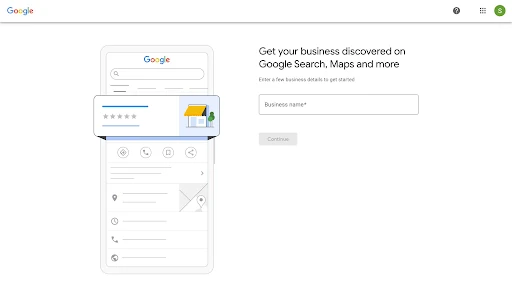
Enter Exact Legal Business Name
Type your business name precisely as it appears on real-world signage, legal registration documents, and official branding.
3
STEP 3
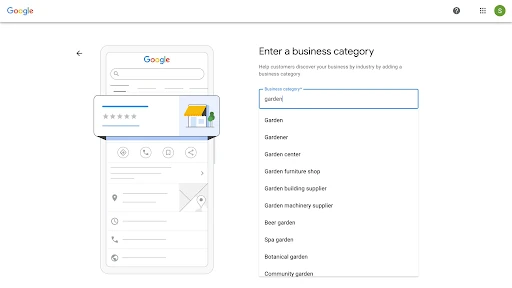
Choose Primary Service Category
Select the most specific primary category available that matches your core offering. This choice directly influences your local map pack ranking eligibility.
4
STEP 4
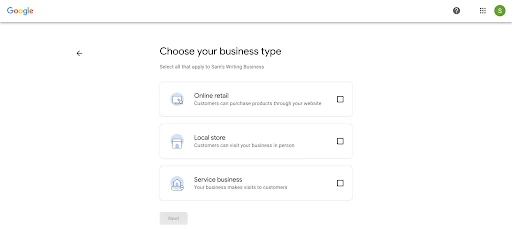
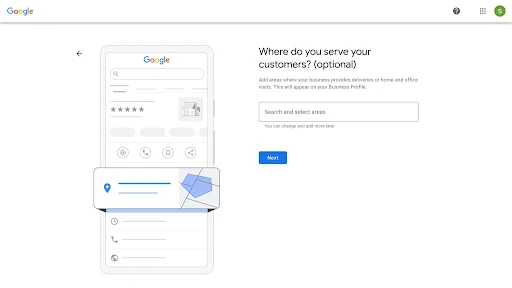
Define Location Type & Service Area
Enter your exact address if customers visit your location in person.
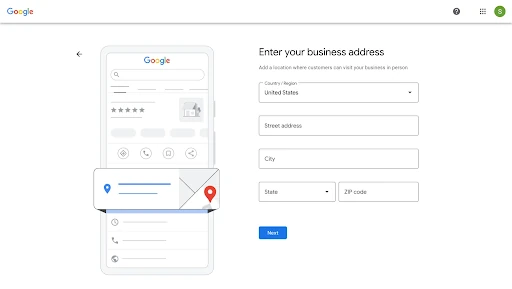
If you visit customers or deliver goods directly, opt to define your service coverage by city, district, or postal codes without showing a street address.
5
STEP 5
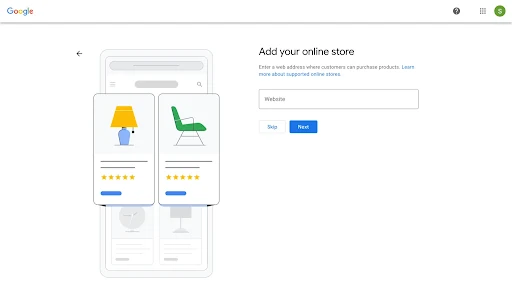
Add Contact Channels & Website
Input your main local telephone number and official landing page URL.
6
STEP 6
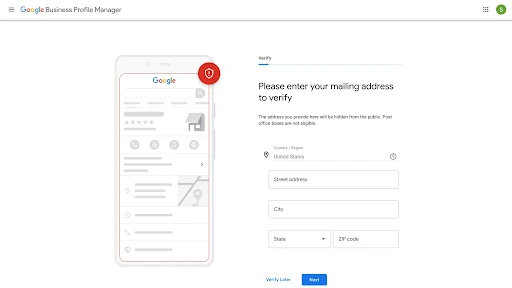
Select Initial Verification Channel
Choose your initial verification path (such as video recording, phone/SMS code, or email) to submit the listing for Google approval.
Accessing Your Google Business Profile
It has been observed that customers are 2.7 times more likely to find a business reputable with a complete Google Business Profile. And accessing your GBP is now easier than ever.
No Separate App or Portal
You no longer need to navigate a separate portal. Access is tied directly to the standard Google Account associated with your business.
Direct Access via Search
Ensure you are signed in to your primary business account, then search for your exact business name or type “my business” into Google Search.
Your profile management controls will appear directly at the top of the search results.
Direct Access via Maps
Open the Google Maps app on mobile or desktop, tap your profile icon or the Business tab.
Then select your location to edit hours, post updates, or manage reviews.
Central Management Hub
You can still visit business.google.com to view a list of all locations associated with your Google Account.
Claiming an Existing Business Listing
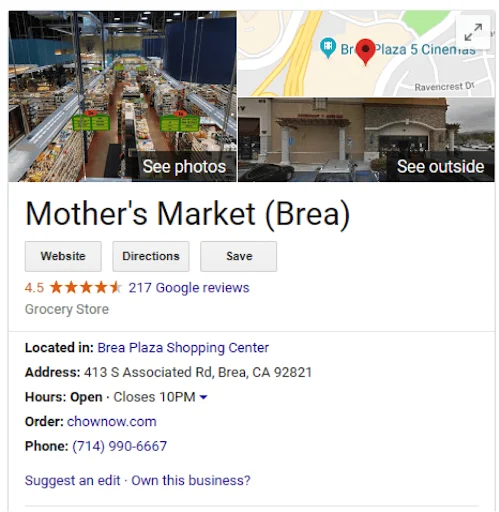
Unclaimed Listings
Displays an “Own this business?” or “Claim this business” link directly on the profile in Google Maps or Search.
Anyone with authority can click this button to initiate immediate verification and take control.
Claimed Profiles
(Managed by Someone Else)
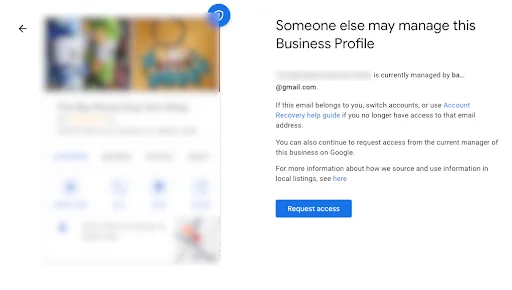
Displays a message stating “Someone else may manage this Business Profile” when you attempt to add the location.
This occurs if a former employee, agency, or third party verified the listing previously.
How to Claim Existing Business Lisinting
1
STEP 1
Find the Live Profile
Search for your business name and address on Google Maps or Search.
2
STEP 2
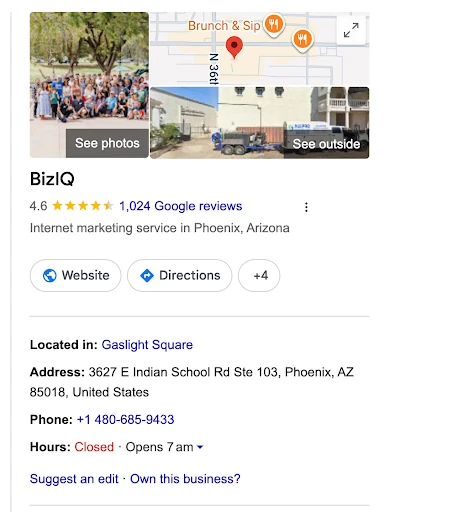
Select Ownership Option
Click Claim this business or Own this business? on the profile panel.
3
STEP 2
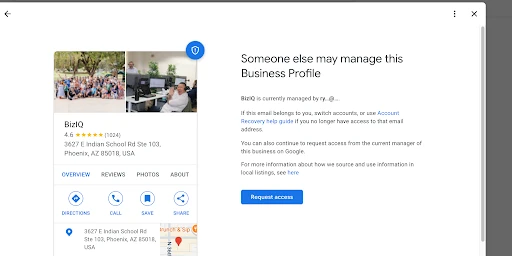
Request Ownership Option
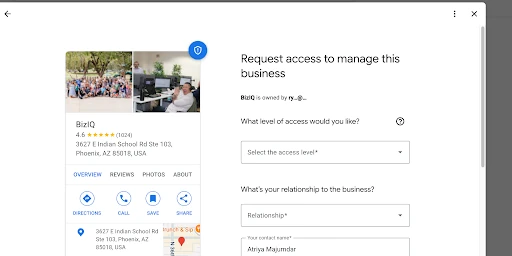
If already managed, click Request Access, choose Owner level, and submit your contact details.
4
STEP 4
Wait Out the Respond Window
Allow 3 days for the current manager to review and approve the transfer request.
5
STEP 5
Transfer or File Appeal
Gain direct access upon approval, claim unmanaged profiles after 3 days, or submit official business documents if denied.
Profile Verification Methods & Requirements
Video Recording
- Submit a continuous 1- to 2-minute mobile video showing your street location, official business signage, and physical access to management areas.
- Google reviews video submissions within 3 to 5 business days to verify real-world operational presence.
Phone Call & SMS
- Receive a 5-digit verification code sent via automated voice call or text message directly to your official business phone line.
- This instant verification method is available for select established listings with non-VoIP landline or mobile numbers.
Live Video Call
- Join a scheduled, interactive video session with a Google Support representative to verify your business live.
- You will demonstrate your physical space, permanent signage, and business registration documents directly on camera during the call.
Email Verification
- Send a secure confirmation code directly to an official company email address matching your business domain.
- Once submitted, your profile receives instant verification approval without waiting for physical document reviews.
Tips for Video Submission
Keep It Continuous
Record in one single, uninterrupted stream without pauses or edits.
Enable Device GPS
Turn on high-accuracy location services on your phone before tapping record.
Protect Privacy
Record in one single, uninterrupted stream without pauses or edits.
Scaling Beyond a Single Location
Setting up one profile gets your business on the map, but managing dozens or hundreds of locations requires a fundamentally different operational approach. Multi-location brands face constant challenges with data consistency, rogue profile edits, and fragmented local updates across regional teams.
At Vicinus, we solve these multi-location hurdles by uniting all your business profiles into a single, automated command center. With bulk data editing, instant listing security, and centralized multi-location monitoring, Vicinus eliminates manual updates and protects your local search presence across every site.
Explore Our Expertise
Frequently asked questions
Sign in to business.google.com using a dedicated Google Account, enter your exact legal business name, select your primary service category, and define your location or service area. Add your business phone number and website link, then select an available verification method to submit your listing.
Ensure you are signed in to the Google Account linked to your listing and search for your exact business name or type “my business” directly into Google Search or Google Maps. Google retired standalone GMB login portals, allowing you to manage listing details directly from search results or business.google.com.
Locate the existing profile on Google Search or Maps, click “Claim this business” or “Own this business?”, and follow the prompts to request access. If another account currently owns the listing, Google sends them an automated request; if they do not respond within 3 days, you can claim ownership or appeal directly with business documentation.
Instant verification methods like phone call or SMS take only a few seconds, while standard video submissions take up to 5 business days for Google’s review team to process. High-risk listings or manual document appeals can extend the review timeline to 1 to 2 weeks.
Yes, creating, claiming, and managing a Google Business Profile is completely free. Google does not charge businesses to list their location, upload photos, collect reviews, or rank in organic local search results.
Still looking for an answer?
Drop us an email and we will get back to you within 24 hours.




