Bing Places for Business

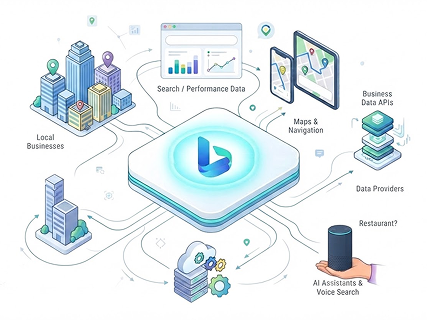
Most multi-location teams publish a Bing Places listing once and never revisit it, devoting virtually all local SEO resources to Google. However, Bing’s local index quietly grounds real-time web answers for AI assistants like ChatGPT and Microsoft Copilot. More than a marketing checkbox, an accurate, verified Bing profile is a core requirement of your enterprise AI-visibility stack.

To build a resilient presence across engines and AI models, explore our complete Local Listing Management hub or dive deeper into Bing Places for Business.

Why Bing Places?

Bing holds the second-largest search engine market share in the US at 12.06%. A complete business profile helps drive that customer traffic to local stores.

Grounding Generative AI

Bing’s local index provides the primary real-time data foundation for Microsoft Copilot and ChatGPT web search results.

Preventing Data Corruption

Missing or unverified profiles on Bing Places for Business force AI answer engines to pull from stale web scrapes or omit your locations entirely.

Capturing Enterprise Desktop Traffic

Edge remains the default browser across vast corporate and government IT networks, giving Bing an outsized share of high-intent B2B desktop searches.

Feeding Connected Networks

Bing’s data graph powers local discovery across third-party search engines and voice assistants, extending your reach well beyond standard Bing queries.

Zero-Maintenance Multi-Platform Sync

Bing Places connects directly to your Google Business Profile, allowing automatic, recurring imports of locations, hours, and NAP (Name, Address, Phone) data to eliminate manual duplication.

Reaching Affluent Demographics

The desktop Bing audience skews heavily toward higher household incomes and mature decision-makers, driving higher average order values (AOV) and conversion rates for local services.

Treating Bing Places as an essential data source ensures your brand remains visible across modern answer engines.

To align your overall strategy, explore our guides on AI Search Optimization Tips and Hyper-Local SEO in the Age of AI.

Bing Places vs. Google Business Profile vs. Apple Business

While Google Business Profile captures primary search volume, Bing Places and Apple Business operate on distinct ranking algorithms, richer media limits, and dedicated AI ecosystems. Understanding how Bing evaluates visual assets, aggregates third-party reviews, and calculates web popularity allows multi-location brands to maximize visibility across desktop networks and AI answer engines.

Feature /
Dimension
Google Business Profile Google
Business Profile
Bing Places for Business Bing Places for
Business
Apple Business Apple Business
Primary
Ecosystem
Google Search, Google Maps,
Android OS, Chrome
Microsoft Bing, Windows
Search, Edge, Microsoft Maps
Apple Maps, Siri, Spotlight,
Apple Wallet, Safari
AI Grounding Google Gemini, Google
Assistant, AI Overviews
Microsoft Copilot, ChatGPT
(via Bing web index)
Siri, Apple Intelligence
Core Ranking
Factors
Relevance, Distance,
Prominence
Relevance, Distance,
Popularity
Proximity, Category
Relevance, Entity
Completeness
Review Sources Native Google Reviews only Multi-source aggregation
(Yelp, TripAdvisor, Birdeye,
YellowPages) + native
Aggregated third-party
reviews (Yelp, TripAdvisor) +
native ratings
Photo & Media
Specs
Min 250×250px; Max file size
5MB
Min 480×360px; Max file size
10MB (richer visual display)
Min 480×480px; Curated
Place Cards & Showcases
Sync & Setup Manual entry / direct API;
Primary master record
1-click import from GBP or
direct manual/API entry
Manual entry or direct API via
Apple Business

Key Algorithmic Differences

Popularity v/s Prominence

Google and Bing both rely on distance and relevance to filter local results, but they measure authority and trust through different algorithmic mechanisms
Bing Measures Popularity via the Open Web

Bing evaluates external web signals, citation density, and review sentiment on third-party portals like Yelp and TripAdvisor. The broader your footprint across authoritative web directories, the higher your popularity score on Bing.

Google Measures Prominence via Real-World & Native Authority

Google prioritizes real-world brand prominence (offline fame, landmarks, brand searches) alongside native Google review volume, rating scores, and backlink authority.

Relevance & Organic SEO Weighting

Bing treats your website’s organic SEO as a primary factor in determining keyword Relevance, whereas Google factors organic web positioning into its Prominence calculation.

Claiming & Verifying Your Bing Places Listing

Establishing consistent NAP (Name, Address, Phone) data across all major search ecosystems is essential for reinforcing your brand’s local domain authority. Securing your verified Bing Places listing ensures accurate operating information displays across Bing Maps while preventing unauthorized third-party edits. Use these four sequential steps to set up and validate your business profile.

  1. 1
    Step 1

    Access Bing Portal

    Navigate to the Bing Places for Business login portal using a Microsoft account and search for existing business records by phone number or physical address.

  2. 2
    Step 2

    Claim or Create Listing

    Select an existing profile match to claim ownership, or enter your business details from scratch if no profile exists.

  3. 3
    Step 3

    Submit Official Appeal

    Fill in your exact business name, physical street address, primary category, opening hours, and website landing page.

  4. 4
    Step 4

    Verify Listing Ownership

    Complete the Bing Places verification step using phone call, SMS, postcard PIN, or instant verification via an authorized Google Business Profile.

For a comprehensive walkthrough, read our guide on How to Set Up Your Business on Bing Places.

Easily Import From Your Google Business Profile

If you already manage a verified Google Business Profile, you don’t need to rebuild your local presence from scratch. Bing Places allows you to directly sync your existing profile data, ensuring perfect consistency in your core business information across both search engines. This native integration eliminates tedious manual data entry and drastically reduces setup time.

Automated Initial Setup

Connecting your Google account allows you to import GBP to Bing with a single click, instantly transferring your business name, address, categories, operating hours, and photos.

Instant Verification

Importing from GBP to Bing Places automatically bypasses manual postcard or phone verification for listings already verified on Google.

A Word of Caution

Import Is Not Ongoing Sync

A one-time import does not permanently sync Google Business Profile to Bing. OAuth session expirations and platform field mismatches frequently cause profiles to drift apart over time.

Risk of Profile Drift

Independent edits to holiday hours, phone numbers, or categories on Google do not automatically sync to Bing, creating conflicting location data across platforms.

To ensure your source data remains fully optimized before transferring details, manage your primary listing with our Google Business Profile Management framework.

Managing Bing Listings Across Multiple Locations

Scaling presence across multiple branches quickly surfaces the limitations of native dashboard management. Fragmented and disparate location updates and recurring verification cycles introduce costly operational drag and compromise brand consistency. Moving toward a centralized management model eliminates manual bottlenecks and keeps multi-unit data accurate at scale. 

Manual Bottlenecks

Attempting native bulk Bing Places management forces marketing teams to execute repetitive, per-location edits for every schedule change or attribute update.

Operational Friction

Attempting to manage multiple Bing listings individually leads to tracking headaches with verification codes, inconsistent location data, and high error rates.

Enterprise Scalability

Transitioning from manual native tools to an automated listing layer enables centralized, portfolio-wide updates across your entire Bing Places multi-location footprint.

To eliminate operational friction across every search engine and platform, explore our Local Listing Management solutions

Keeping Bing in Sync with Your Other Listings

Conflicting business names, addresses, or phone numbers on Bing undermine your entire local search authority and confuse generative AI engines. Maintaining continuous Bing NAP consistency ensures search algorithms validate your location data seamlessly across every major web index. Preventing data drift preserves high accuracy in your Bing listing, protecting enterprise rankings from local trust penalties. 
Learn how unified location data strengthens your entire citation ecosystem in our guide to NAP Citations.

How Vicinus Manages Bing Places at Scale

Vicinus eliminates the friction of multi-location listing management by acting as a single, centralized command center for your entire search footprint. By automating bulk synchronization and proactive listing health audits, the platform ensures every branch profile on Bing Places remains accurate, fully optimized, and protected against unauthorized edits. This unified infrastructure allows enterprise marketing teams to scale local visibility without adding manual overhead.

Centralized Location Control

Update operational hours, attributes, and NAP data across Bing Places, Google, and major citation networks from one unified dashboard.

Automated Data Synchronization

Push bulk updates across hundreds of locations simultaneously, eliminating repetitive manual entry and fragmented verification tracking.

Real-Time Accuracy Monitoring

Continuously audit listing health to detect missing fields, unauthorized changes, and profile discrepancies before they impact search visibility.

Data Drift Prevention

Enforce consistent location data across every platform to ensure Bing Places stays continuously aligned with your primary search footprint.

To streamline enterprise operations across every search engine, explore our Listing Management Features.

Frequently asked questions

Sign into the Bing Places portal with a Microsoft account, search for your business to claim an existing listing, or create a new profile manually or via Google Business Profile import.

Yes. Linking your Google account copies your business details directly into Bing Places and grants instant verification for profiles already verified on Google.

Verify your listing using a phone call, SMS PIN, physical postcard, or instant verification by connecting an authorized Google Business Profile.

Bing’s index powers live web answers for AI assistants like ChatGPT and Microsoft Copilot. A missing or unverified profile causes AI tools to return stale data or omit your business.

Yes. Upload bulk spreadsheets directly in Bing Places or use a centralized listing management platform like Vicinus to automate updates across all locations.

Still looking for an answer?

Drop us an email and we will get back to you within 24 hours.

Are you ready to accelerate your business with the Vicinus edge?

